
Newark Airport EWR
FlightInfoApps.comTravel & Local
4.533.00 Reviews
- Version
- 26.8.23
- Installs
- 10.00K
- Age Rating
- Mature 17+
Screenshots

Our Review of Newark Airport EWR
 Analysis by Appyee
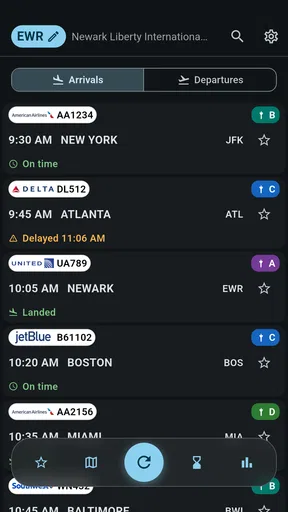
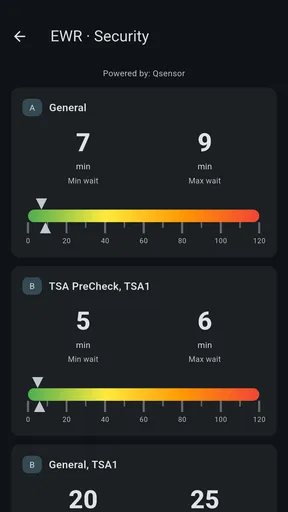
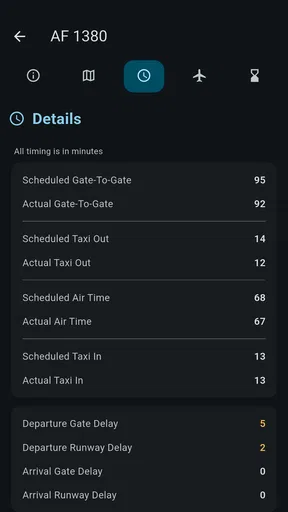
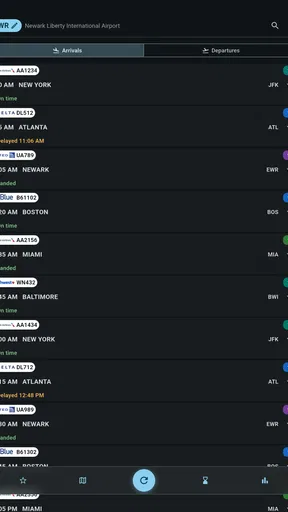
When I am heading through Newark Liberty International Airport, I want one thing first: a quick way to understand what is happening at the airport without digging through several screens or relying on a general travel app. Newark Airport EWR is built for that narrow purpose. It is a free Travel & Local app from FlightInfoApps.com that focuses on live arrivals, departures, gates, and delays for Newark Airport. After using it, I see it as a practical companion for passengers who already know they are flying through EWR and want airport information close at hand.
The app is not trying to replace a full airline account, a boarding pass wallet, or a broad trip planner. That is important to understand before installing it. Its value comes from concentrating on one airport rather than spreading attention across an entire itinerary. If Newark is the airport you need to monitor, that focused approach can be more useful than a large travel app filled with unrelated tools.
What to expect before you rely on it
The first impression is straightforward: this is an airport-status tool, not a general guide to New York or New Jersey. Its store summary points directly to live arrivals, departures, gates, and delays, so I would approach it when I need operational information rather than restaurant recommendations, sightseeing ideas, or a complete booking experience.
That focus makes the app especially suitable for three kinds of users. A departing passenger can check whether a flight is moving normally before leaving home. Someone collecting a traveler can watch an arrival and avoid waiting blindly at the terminal. A family member or colleague can keep an eye on the airport situation without needing to manage the traveler’s airline login.
Newark can be confusing because a change in timing is not always the same as a change in gate, and a gate update is not the same as a boarding instruction. I treat the app as a useful awareness tool, not as permission to ignore the airline’s own messages. The airline remains the place where I would confirm check-in requirements, boarding details, baggage rules, and any last-minute instruction addressed specifically to my booking.
The app has an average rating of 4.5 from 141 ratings, with 33 written reviews, and it has passed 10K+ installs. Those figures suggest that it has found a real audience, although they are not a guarantee that every flight update will arrive at exactly the moment a user expects. Airport information changes quickly, so I value the ability to check the latest screen myself rather than assuming that an earlier result will remain current.
It is also worth noticing the audience setting. Newark Airport EWR carries a Mature 17+ content rating. That does not change the practical airport purpose I found in the app, but parents choosing travel tools for a younger user may want to review the store presentation before installing it on a shared device.
Who will get the most from the focused design
I would recommend trying it if Newark is a regular part of your travel routine, if you often pick people up from EWR, or if you prefer a dedicated airport screen over a broad travel platform. The narrower design can reduce the amount of searching needed when the only question is whether a flight is arriving, departing, delayed, or associated with a different gate.
It is less compelling for a traveler who moves between many airports and wants one universal dashboard. In that situation, an airline app or a multi-airport flight tracker may be more convenient because the user can keep several airports and reservations together. Newark Airport EWR makes more sense when EWR itself is the center of attention.
Getting started without overcomplicating the setup
The app is free to install, which makes the first test fairly low-risk. It was released on November 7, 2013, and the current version is 26.8.23, with Android support starting at version 7.0. That broad device compatibility is helpful for people who keep an older phone as a travel backup, provided the device meets that minimum system requirement.
My advice for a first-time user is to install it before the journey rather than while standing in a crowded terminal. Open it when you have a stable connection, look through the Newark flight information, and get familiar with where arrivals and departures are shown. The goal is not to master every screen; it is to know where you will look when the trip becomes time-sensitive.
A simple preparation routine works well:
- Have the airline name and flight number available from the booking or boarding pass.
- Decide whether you need departure information, arrival information, or both.
- Check the airport information before leaving for the terminal.
- Compare any important change with the airline’s own notification or boarding information.
This workflow avoids a common mistake: opening an airport app without knowing what question you are trying to answer. If I am collecting someone, I look for the arrival rather than browsing departures. If I am flying out, I focus on the departure listing and then use the airline’s instructions for the rest of the trip.
Newark Airport EWR includes in-app purchases ranging from $3.49 to $32.99 per item. Because the main app is free, I would pay attention to what an optional purchase adds before confirming anything. A user who only needs occasional status checks may find the free experience sufficient, while a frequent Newark traveler may decide that an extra option is worthwhile. I would not purchase immediately just because the app is useful; I would first use it during a normal airport check and decide whether the added value matches my routine.
My first meaningful success with the app
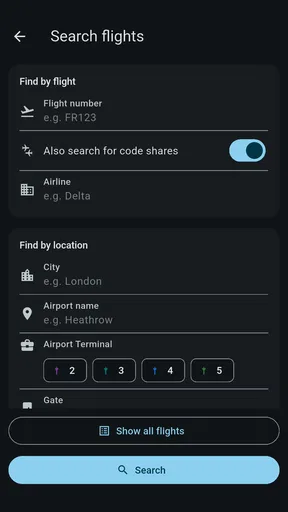
The first useful result should be concrete: finding the relevant flight and understanding its current airport status. I would begin by choosing the appropriate side of the airport activity, then locate the flight using the identifying information from the itinerary. Once the flight appears, I would read the status together with the gate and timing details rather than focusing on only one field.
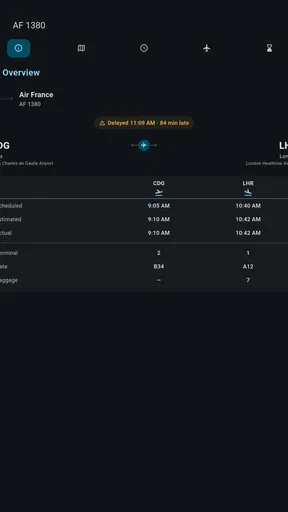
That last point matters. A flight that appears on time can still have a gate change. A listed gate can also be useful for orientation without telling me how long security, walking, or boarding will take. I use the app to answer, “What is the airport currently showing?” Then I make travel decisions using the airline’s instructions, my location, and the time I need to reach the terminal.
For a departing passenger, a realistic morning routine might look like this: I check the flight at home, note whether the displayed timing has changed, and then check again before entering the airport. At the terminal, I use the app as a second reference while watching the physical screens. This is more reliable than taking a single early check as final, because airport operations can change after I leave home.
For an arrival pickup, I would check the flight before driving to Newark and again while waiting. If the arrival time shifts, I can delay my departure or adjust where I wait instead of spending unnecessary time circling the airport. The app cannot remove traffic or guarantee that a passenger will exit baggage claim quickly, but it can help me avoid treating the original schedule as fixed.
For a family member, the useful workflow is similar. I can monitor the airport-side information without asking the traveler to forward every update while they are dealing with security, boarding, or a weak connection. I still would not use a displayed airport status to guess when someone will be physically outside the terminal. Arrival, baggage collection, and pickup timing are separate stages.
Small habits that make the information more useful
One of the less obvious benefits of a dedicated airport app is that it encourages a better checking habit. Instead of reopening a full booking platform and navigating through a trip, I can go directly to the airport activity that matters. That is particularly handy when I am helping another person and do not have access to their reservation details.
I also recommend checking the flight by its exact identifying details instead of relying only on a remembered departure time. Several flights can have similar routes or schedules, and a small memory error can lead to watching the wrong listing. Keeping the itinerary visible while searching reduces that risk.
Another useful trade-off is deciding when not to refresh constantly. Repeatedly checking an airport screen can create anxiety without improving the decision. I prefer a planned check before leaving, another check near the airport, and a final look when I am in the terminal. If the airline sends a direct alert, I treat that as an important prompt to review both sources.
For pickups, I separate “the aircraft has arrived” from “the traveler is ready to meet me.” That distinction prevents one of the most common airport misunderstandings. The app can help me follow the flight’s airport status, but it cannot account for walking time, baggage delays, customs procedures, or a passenger who has not yet reached the meeting point.
Where first-time users may get confused
The biggest source of confusion is expecting the app to behave like a boarding pass. It does not replace the airline’s check-in process or provide the personal travel controls associated with a reservation. I would keep my airline app, email confirmation, or boarding pass available and use Newark Airport EWR as the airport-status layer beside them.
Another possible misunderstanding concerns gates. A gate shown in an airport listing is valuable for orientation, but it should not be treated as permanent. Airlines and airports can revise gate assignments, sometimes after a traveler has already started walking. I would always look again at the terminal’s official screens and listen for announcements once inside.
Delays can also be read too simply. A delay shown for a flight tells me that the schedule has changed, but it does not automatically explain the cause or predict the exact time I will board. I use that information to decide whether I should recheck the airline’s messages, contact a travel companion, or adjust my pickup plan. I would avoid making a complicated connection decision from the airport listing alone.
The app’s single-airport focus is both its strength and its limitation. If my trip includes Newark today and another airport tomorrow, I may prefer a broader service that keeps the entire journey in one place. On the other hand, broad services can bury airport-specific details beneath bookings, loyalty features, maps, and promotional material. For a Newark-only question, the focused screen may get me to the answer faster.
I would also be careful with any optional paid feature. The available in-app purchase range goes up to $32.99 per item, so the right choice depends on how often I use the app and what the purchase provides. An occasional passenger should test the core experience first. A frequent airport user can judge the purchase by repeated usefulness, not by the promise of having more tools on the screen.
When another option is the better choice
I would choose the airline’s own app first when I need booking management, check-in, boarding information, baggage instructions, or a message tied to my passenger record. Those tasks depend on the reservation, while Newark Airport EWR is designed around what is happening at the airport.
I would choose a broad flight-tracking service when I need to follow multiple airports, several flights, or a complete journey involving connections. I would also use official airport displays once I am inside Newark, especially when a gate or boarding instruction affects what I do next. The dedicated app works best as a convenient extra reference, not as the only authority in a fast-changing situation.
That does not make it redundant. The app has a clear role between the itinerary and the terminal screen. It can be opened by a person who is not traveling, used before reaching the airport, and kept as a simple way to focus on Newark activity. Its usefulness comes from that in-between position.
My recommendation after using it
Newark Airport EWR is a sensible free tool for anyone who repeatedly needs live airport information for EWR. I like the fact that its purpose is easy to understand: check arrivals, departures, gates, and delays without turning the task into a full travel-planning session. The developer, FlightInfoApps.com, has kept the concept centered on the airport rather than trying to make it a universal travel replacement.
My recommendation is strongest for pickup planning and quick pre-departure checks. Those are situations where a focused airport view can save time and reduce uncertainty, especially when I am checking for another person. The app is also approachable for a first-time user because the path to a useful result is short: open it, find the relevant airport activity, locate the flight, and compare the displayed status with the airline’s information.
I would skip it if I want one app to handle every part of a complex trip, or if I rarely use Newark and already have a preferred multi-airport tracker. I would also avoid treating any airport-status app as a substitute for official announcements. The best results come from using it as one layer in a sensible travel routine.
After the first successful check, the next step is to make it part of a repeatable habit rather than opening it only during a crisis. Save the flight details in an easy-to-reach place, check before setting out, and check again near the terminal or pickup area. Used this way, Newark Airport EWR is most valuable as a focused second set of eyes on the airport day.
For my own travel setup, I would keep the app installed if Newark appeared regularly in my plans. It is not a complete travel assistant, and its optional purchases deserve a deliberate decision, but its narrow purpose is practical. If your main question is what is currently happening with a flight at Newark Airport, this is a straightforward place to begin.
Verdict
Strengths of Newark Airport EWR
- Provides real-time flight status and gate information for EWR travelers.
- Useful terminal maps help locate gates, baggage claim, and airport facilities.
- Airport parking details make planning arrival and pickup more convenient.
- Official updates can help passengers track delays, closures, and airport notices.
- Simple access to Newark Liberty Airport information in one dedicated app.
Limitations of Newark Airport EWR
- Information may become outdated briefly during fast-changing airport disruptions.
- Some features may depend on an active internet connection.
- The app is mainly useful for Newark Airport, not multiple travel destinations.
- Flight details may vary from airline notifications or airport display boards.
- Users may find limited value when they are not currently traveling through EWR.
Other Releases by FlightInfoApps.com
View All
Chicago O'Hare ORD
Travel & Local4.4
Similar Picks in This Category
View All
Google Maps
Google LLC3.4

Google Maps Go
Google LLC4.1

Booking.com: Hotels & Travel
Booking.com Hotels & Vacation Rentals4.8

Google Earth
Google LLC3.8

Skyscanner Flights Hotels Cars
Skyscanner Ltd4.8

trivago: Compare hotel prices
trivago N.V.4.4
Frequently Asked Questions
What is the Newark Airport EWR app used for?
Newark Airport EWR is designed to help travelers plan and manage their journey through Newark Liberty International Airport. It can provide useful airport information such as terminal details, flight updates, parking guidance, transportation options, maps, amenities, and services. Before relying on it during a trip, check whether the information is updated in real time and confirm important details with your airline or the official airport website.
Can Newark Airport EWR show live flight information?
The app may offer flight search and status information, including departure and arrival times, terminal details, gate updates, delays, and cancellations. However, airport schedules can change quickly, and some updates may appear after the airline has already changed them. I recommend using the app as a convenient reference while also checking your airline’s official notifications, especially on the day of travel or during severe weather.
Does Newark Airport EWR provide terminal maps and navigation?
Yes, one of the most useful features for first-time visitors is access to airport maps and terminal information. These resources can help you locate check-in areas, security checkpoints, baggage claim, gates, lounges, restaurants, restrooms, and ground transportation. Keep in mind that construction, temporary closures, and security restrictions may affect walking routes, so follow airport signs and staff instructions whenever the app’s map differs from what you see on site.
Can I use Newark Airport EWR to find parking and transportation?
The app can be helpful for reviewing parking areas, pickup and drop-off locations, rental car services, taxis, rideshare zones, public transportation, and connections to nearby destinations. Availability, pricing, and pickup rules may change regularly, so travelers should verify current rates and operating conditions before leaving for the airport. For rideshare services in particular, always follow the designated pickup instructions shown at the airport.
Is Newark Airport EWR free to download, and does it require internet access?
The application may be available as a free download, although certain features, advertising, or external services can vary depending on the version and platform. An internet connection is generally needed for live flight updates, directions, transportation information, and other current data. Because airport Wi-Fi or mobile coverage may be unreliable, save essential flight details, boarding passes, reservation numbers, and directions before arriving at Newark Liberty International Airport.
